
MacBook Pro 16-inch M5 Pro / M5 Max (2026): Refurbished, Specs & Repairs
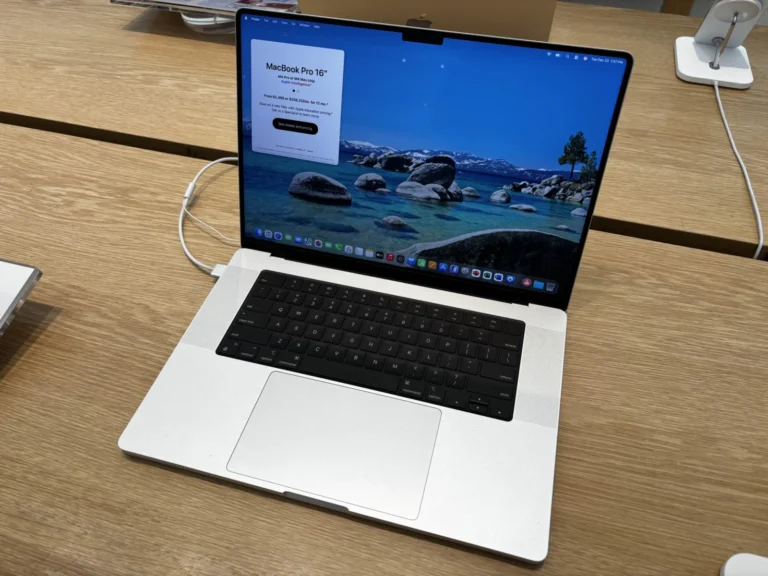
Apple’s biggest-screen laptop with the newest Pro chips
The MacBook Pro 16-inch M5 Pro / M5 Max (2026) is Apple’s most powerful laptop, with a 16.2-inch Liquid Retina XDR display, the largest battery in any MacBook and fans that let it sustain full performance during long jobs. It keeps a full set of ports: three Thunderbolt 5, HDMI, an SD card slot and MagSafe 3.
It is built for video editing, 3D, music production, photography and software development. Used examples are still rare, and most are covered by Apple’s own warranty. If you want one, tell us the chip, memory and storage you need and we will tell you what we can source.
Every refurbished Apple silicon MacBook Pro we sell is checked by our technicians and comes with a 24-month warranty. Browse our refurbished MacBook Pro range, or book a repair if you already own one.
About This Model
The MacBook Pro 16-inch M5 Pro / M5 Max (2026) was announced on 3 March 2026 and went on sale on 11 March 2026. UK prices started at £2,699 for the M5 Pro model and £3,899 for the M5 Max model.
Complete Mac Solutions supplies refurbished Apple Macs in Bristol for creative professionals, students and businesses across the UK. We also offer MacBook Pro repairs, including damage that Apple’s warranty does not cover.
Which MacBook Pro does this cover?
This guide covers the MacBook Pro (16-inch, M5 Pro or M5 Max). Choose About This Mac from the Apple menu: the chip will be shown as Apple M5 Pro or Apple M5 Max, and the model name will say 16-inch.
It looks almost identical to the 16-inch M1, M2, M3 and M4 Pro and Max models, so check the chip name rather than relying on the design or year of purchase. It is a different machine from the 14-inch MacBook Pro with the same chips, which is smaller, lighter and has a shorter battery life.
Specifications at a glance
| Display | 16.2-inch Liquid Retina XDR display, 3456 × 2234 resolution, ProMotion up to 120Hz |
|---|---|
| M5 Pro | 18-core CPU; 20-core GPU |
| M5 Max | 18-core CPU; 32-core or 40-core GPU |
| Memory | 24GB or 48GB (M5 Pro, up to 64GB); 36GB or 48GB (M5 Max, up to 128GB) |
| Storage | 1TB or 2TB as standard; up to 4TB (M5 Pro) or 8TB (M5 Max) |
| Connections | Three Thunderbolt 5 (USB-C) ports, HDMI, SDXC card slot, MagSafe 3 and headphone socket |
| Battery | 100Wh; up to 24 hours (M5 Pro) or 22 hours (M5 Max) of video streaming, by Apple’s test |
| Charging | MagSafe 3 or USB-C; 140W adapter needed for full-speed charging |
| Size and weight | 1.68cm thick, 35.57cm wide, 24.81cm deep; approximately 2.15kg |
Ask us to confirm the exact configuration of any refurbished machine available. Configurations vary widely, so check the chip, memory and storage carefully.
M5 Pro versus M5 Max
The M5 Pro is more than enough for most professional work, including photo editing, music production, software development and 4K video editing. On the 16-inch model it always has the full 18-core CPU.
The M5 Max adds far more graphics cores, starts with 36GB of memory and supports up to 128GB. That matters for heavy 3D work, high-resolution video, complex effects and large AI models. It also uses more power, so battery life is a little shorter. If you are not sure which you need, tell us what software you use and we will advise.
Is the 16-inch size right for you?
The 16-inch screen gives noticeably more room for timelines, layers and side-by-side windows, and the larger case lets it run longer and cooler under sustained load. It is the better choice if you work on the laptop screen for long sessions.
At around 2.15kg it is much heavier than the 14-inch model and takes up more space in a bag. If you carry your laptop every day, the 14-inch M5 Pro / M5 Max may suit you better.
A MacBook Pro for Bristol students
For film, animation, music, design, engineering and computer science students, the 16-inch M5 Pro will handle demanding course software for many years. For most other courses it is more than you need, and a MacBook Air costs far less.
Check course software requirements before buying, and ask about our student deals.
MacBooks for businesses
Complete Mac Solutions supplies Macs for businesses as well as individuals. Tell us which applications and peripherals your team uses so we can help you choose a suitable configuration.
For studios and production companies, the 16-inch MacBook Pro offers desktop-class performance with years of macOS support in a portable laptop. Thunderbolt 5 suits fast external storage and high-resolution displays, and the M5 Max can drive up to four external displays.
macOS compatibility
As a new Apple silicon Mac, this model runs the current version of macOS and should receive macOS updates for many years. That gives it a much longer working life than older Intel MacBook Pro models.
Some older Intel-only applications and plug-ins may not run. Check that the software you depend on supports current macOS and Apple silicon before you buy.
Memory and storage choices
The unified memory is part of the chip and cannot be upgraded later, and the internal storage cannot be expanded in the usual way. Choose enough of both for the projects you expect to work on over the life of the laptop.
Fast external storage over Thunderbolt 5 is a good way to handle large project files and archives. Ask us about storage options before deciding.
Faults and MacBook Pro repairs in Bristol
Check Apple’s warranty or AppleCare first for faults that develop under normal use. For damage those do not cover, we can help.
Display damage
Cracks, lines, black areas or patches of colour usually mean the display assembly needs replacing. Avoid closing the lid on earbuds, pens or other small items.
Liquid damage
Spills can reach the keyboard, trackpad and logic board. Turn the Mac off, unplug it and bring it in as soon as possible.
Charging, ports and fan noise
If the Mac stops charging, try both MagSafe and USB-C to narrow down the fault, and use a charger of at least 140W for full-speed charging. Constant fan noise during light use can point to a software problem or a blocked vent and deserves assessment.
Complete Mac Solutions can discuss MacBook Pro repairs in Bristol, or you can send your Mac to us by post from anywhere in the UK.
Buying a refurbished MacBook Pro 16-inch M5 Pro / M5 Max (2026)
Make sure the Mac has been removed from the previous owner’s Apple Account and Find My. Confirm the chip, memory and storage match the listing and your needs, because neither can be upgraded later. Check whether any of Apple’s warranty or AppleCare remains.
Complete Mac Solutions carries a large stock of refurbished Macs and has an extensive supplier network to help source suitable configurations. Many of our Macs come fully boxed, with all accessories and in fantastic condition. Packaging, accessories and condition vary between machines, so ask us to confirm what comes with the one you choose.
Explore our Apple Macs for sale or speak to us about a laptop for creative work, study or business. If you already own this model, we can help with repairs and data recovery.
References and further reading
Compare the MacBook Pro 16-inch M5 Pro / M5 Max (2026) with similar models
The 14-inch model has the same chips in a lighter case. An earlier 16-inch M3 Pro or M3 Max can cost much less and still handle most professional work, and the Mac Studio offers even more power for desk-based work.
- MacBook Pro 14-inch M5 Pro / M5 Max (2026)
- MacBook Pro 16-inch M3 Pro / M3 Max (2023)
- MacBook Pro 16-inch M2 Pro / M2 Max (2023)
- Mac Studio M5 Max / M5 Ultra (2026)
Buy or repair a MacBook Pro 16-inch M5 Pro / M5 Max (2026)
Looking for the most powerful MacBook Apple makes? Ask us to source one in the configuration you need, or let us diagnose and quote for a repair on the one you already own.
Top image credit
Photo: AzureSaturn. Wikimedia Commons source · CC0. Resized and compressed to WebP; responsive versions supplied. Design reference: the 16-inch M4 Pro (2024) is pictured; the chip and model year on this page differ.
.jpg)