
iMac 21.5-inch (2015): Refurbished, Specs & Repairs
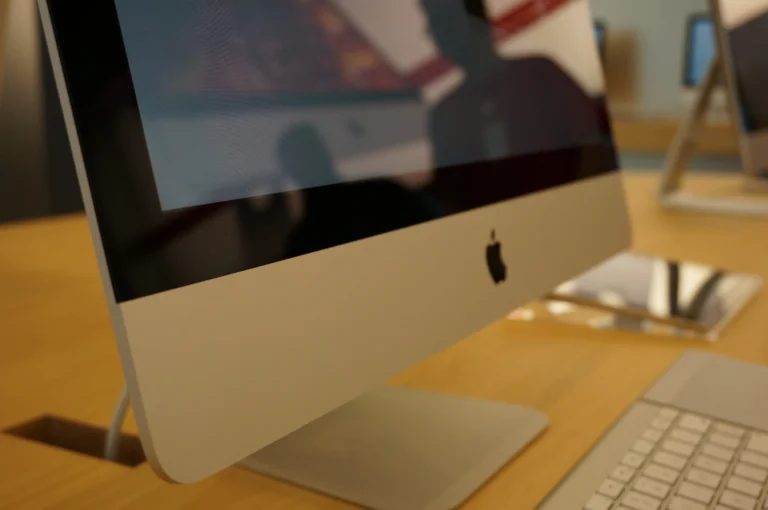
A budget all-in-one iMac for everyday use
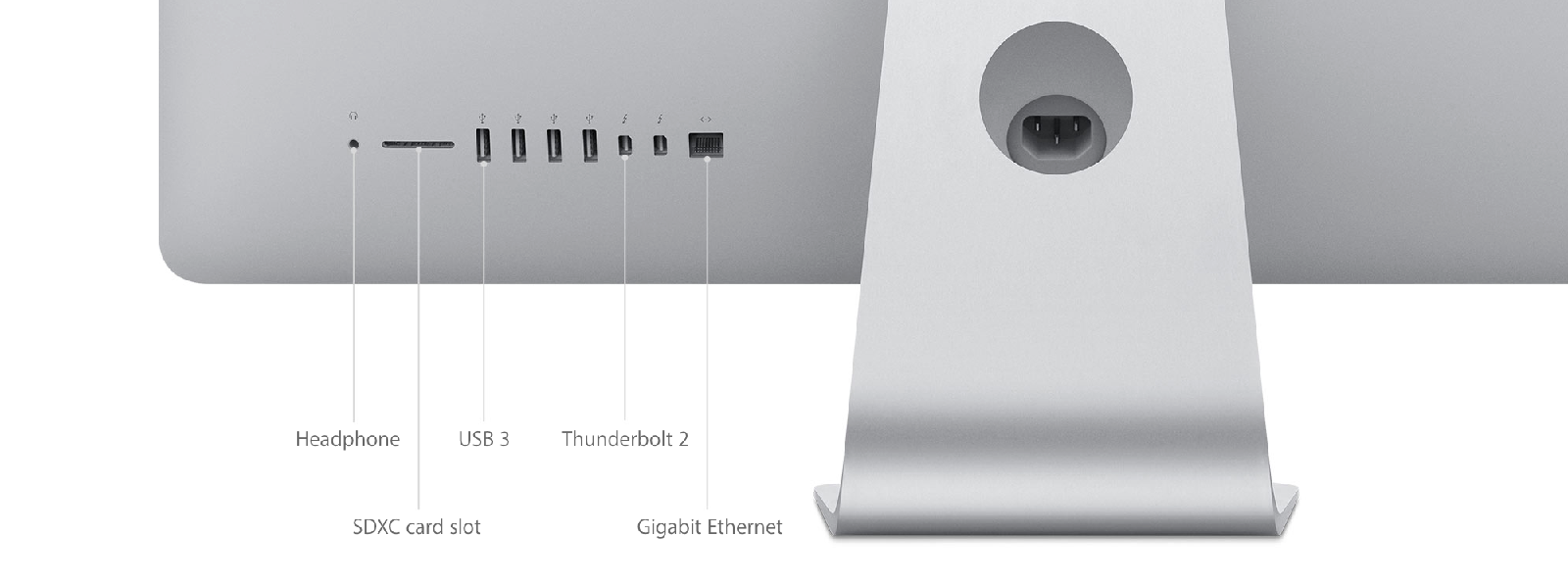
The iMac 21.5-inch (2015) is an affordable way to get an all-in-one Mac for browsing, email, documents and family use. Apple sold it in two versions: a standard model with a 1920 × 1080 display and dual- or quad-core Intel Core i5 processors, and a sharper Retina 4K model with quad-core processors. Both have four USB-A ports, two Thunderbolt 2 ports and an SD card slot.
Many of these iMacs were sold with a hard drive or Fusion Drive, which is the main reason they feel sluggish today. Replacing it with an SSD makes a huge difference. Memory cannot be upgraded in the usual way, so check how much is fitted before buying.
Every refurbished iMac 21.5-inch (2015) we sell is checked by our technicians and comes with a 12-month warranty. Browse our refurbished iMac range, or book a repair if you already own one.
About This Model
The iMac 21.5-inch (2015) is a compact all-in-one desktop with a built-in screen, speakers and camera. Apple offered both a standard Full HD version and a sharper Retina 4K model. As a refurbished purchase, its value depends on the exact specification, storage, condition and software you need.
Complete Mac Solutions supplies refurbished Apple Macs in Bristol for home users, students and businesses. We also offer Apple Mac repairs and can help you decide whether to repair an existing iMac, improve its storage or choose a replacement.
Standard display or Retina 4K?
The two versions look similar, so do not assume that every 2015 21.5-inch iMac has a Retina screen. The standard model has a 1920 × 1080 display; the Retina 4K version has 4096 × 2304 resolution.
The standard version was available with a 1.6GHz dual-core or 2.8GHz quad-core Intel Core i5. The Retina 4K version has a 3.1GHz quad-core Core i5, with an optional 3.3GHz quad-core Core i7.
| Feature | Standard 21.5-inch | Retina 4K 21.5-inch |
|---|---|---|
| Display resolution | 1920 × 1080 | 4096 × 2304 |
| Processor options | 1.6GHz dual-core i5 or 2.8GHz quad-core i5 | 3.1GHz quad-core i5 or optional 3.3GHz quad-core i7 |
| Graphics | Intel HD Graphics 6000 or Iris Pro Graphics 6200, depending on processor | Intel Iris Pro Graphics 6200 |
| Memory | 8GB or 16GB | 8GB or 16GB |
| Original storage | Hard drive, Fusion Drive or SSD configurations | Hard drive, Fusion Drive or SSD configurations |
Both versions have four USB 3 ports, two Thunderbolt 2 ports, Gigabit Ethernet, an SDXC card slot and a headphone socket. These are older Thunderbolt connections, not USB-C ports.
How to identify your iMac
Choose About This Mac from the Apple menu to check the full model name. In System Information, the standard Late 2015 model is identified as iMac16,1, while the Retina 4K model is iMac16,2.
A purchase year or the A1418 number on the casing is not enough to identify the exact specification. Check the model, processor, memory and storage before buying or ordering repair parts.
What is it useful for?
Our recommendation is to consider this generation for modest workloads using compatible software: documents, research, email, household administration and an established work setup. The Retina 4K screen may particularly appeal to someone who wants a sharper desktop display for reading and viewing photographs.
Performance varies considerably between configurations. The entry-level dual-core version and a quad-core machine should not be treated as equivalent. Storage condition and type also matter: a slow mechanical hard drive can make everyday use frustrating even when the processor is adequate.
For demanding creative work or a computer intended to serve as a main workstation for several more years, compare it with a newer Mac. Our iMac 21.5-inch Retina 4K (2019) guide covers a later generation, while the 27-inch Retina 5K iMac guide explains the larger 2015 model.
An iMac for Bristol students
Bristol’s student population includes people who prefer a dedicated desk computer for essays, reading and research. A refurbished iMac can be worth considering where portability is not needed and the price leaves room in the budget for other course essentials.
Check your course requirements before choosing an older model. Examination software and specialist design, engineering or media applications may require a newer operating system or different hardware. If you need a computer for lectures and the library as well as your room, a MacBook may be more practical.
Macs for business
Complete Mac Solutions supplies Macs for businesses as well as individuals. Tell us which applications, printers, storage devices and working arrangements your team uses so we can help match a Mac to the job.
An older iMac may fit a specific, established workflow, but check software support and your organisation’s security requirements before using it as a staff workstation. Purchase price is only one part of the cost: reliability, compatibility and the likely remaining useful life matter too.
macOS and application compatibility
Apple lists macOS Monterey as the newest officially compatible operating system for both Late 2015 21.5-inch versions. That does not mean every current application supports this iMac, or that Monterey receives the security updates required by your business.
Check the requirements for your essential applications before purchase. If you need current software that requires a newer macOS version, ask us about a more suitable Mac.
Storage upgrades and fixed memory
The RAM in these 2015 21.5-inch models is soldered to the logic board. There is no convenient memory access hatch like the one found on some 27-inch iMacs. Choose the memory capacity you need when buying.
An SSD upgrade may make sense for a machine still using a mechanical hard drive. It can reduce delays when starting the computer and opening applications, although it cannot improve operating-system compatibility or remove the limits of an older processor.
The display is attached with adhesive and must be removed to access internal components. Ask us to assess the exact configuration and quote for suitable storage work before deciding whether an upgrade is worthwhile.
Repair concerns on an older iMac
These are useful symptoms to watch for on an ageing machine. They should not be read as defects that affect every 2015 iMac.
Slow startup and storage problems
Long startup times, repeated pauses, startup errors or unusual drive noises can indicate a storage problem, but software and other hardware issues can produce similar symptoms. Keep a backup and arrange an assessment rather than assuming that a reinstall or new drive will solve everything.
Display damage and image faults
Check for cracks, lines, uneven illumination and other visible image problems. The glass and display form a bonded assembly, which can make replacement a significant expense. Compare a repair quote with the value and condition of the whole computer.
Fan noise, heat and shutdowns
Persistent fan noise, overheating symptoms or unexpected shutdowns deserve diagnosis. Possible causes vary, so describe when the problem happens and whether it occurs with particular applications or from startup.
Power and peripheral problems
An iMac that will not power on, loses connections or has unreliable ports needs assessment. When buying, test the camera, speakers, Wi-Fi, Bluetooth and the ports you expect to use. Also confirm that the supplied keyboard and mouse work properly.
Contact Complete Mac Solutions about iMac repairs in Bristol. We can discuss the symptoms and help you weigh repair or upgrade costs against a replacement.
Buying a refurbished iMac 21.5-inch (2015)
Confirm whether the machine has the standard or Retina 4K screen, which processor it uses, how much RAM is fitted and whether it has a hard drive, Fusion Drive or SSD. Check the screen condition and exactly which accessories are supplied.
Complete Mac Solutions carries a large stock of refurbished Macs and has an extensive supplier network to help source suitable configurations. Many of our Macs come fully boxed, with all accessories and in fantastic condition. Packaging, accessories and condition vary between machines, so ask us to confirm what is included with the one you choose.
Explore our Apple Macs for sale or speak to us about a desktop for home, study or business. If you already own a 2015 iMac, we can help you consider whether repair, an SSD upgrade or replacement offers the best value.
References and further reading
- Apple: iMac 21.5-inch (Late 2015) specifications
- Apple: iMac Retina 4K, 21.5-inch (Late 2015) specifications
- Apple: identify your iMac and its newest compatible macOS
- iFixit: 2015 Retina 4K iMac teardown
- iFixit: 2015 standard 21.5-inch iMac teardown
Compare the iMac 21.5-inch (2015) with similar models
The iMac 21.5-inch Retina 4K (2019) has much faster six-core processors on most configurations. The 27-inch 5K models give you more space and upgradeable memory.
- iMac 21.5-inch Retina 4K (2019)
- iMac 27-inch Retina 5K (2015)
- iMac 27-inch Retina 5K (2019)
- MacBook Air 13-inch (2015)
Buy or repair a iMac 21.5-inch (2015)
Contact Complete Mac Solutions to check current stock, ask us to source a specific configuration or book a repair. We supply and repair Macs across the UK. See all models in our Mac model guides.
Top image credit
Photo: Mike Lau. Wikimedia Commons source · CC BY-SA 2.0. Resized and compressed to WebP; responsive versions supplied. Design detail: the slim aluminium iMac introduced in 2012. This photograph illustrates the casing design, not a confirmed screen size or exact model year.
