
MacBook Pro 13-inch (2019, two ports): Refurbished, Specs & Repairs

An entry-level 13-inch MacBook Pro with Touch Bar
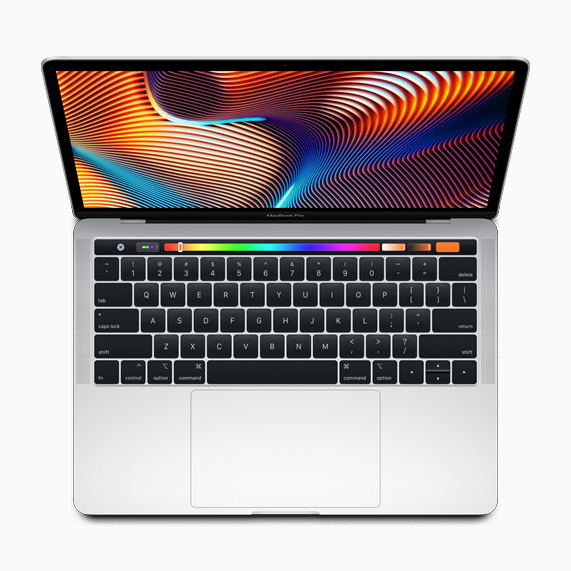
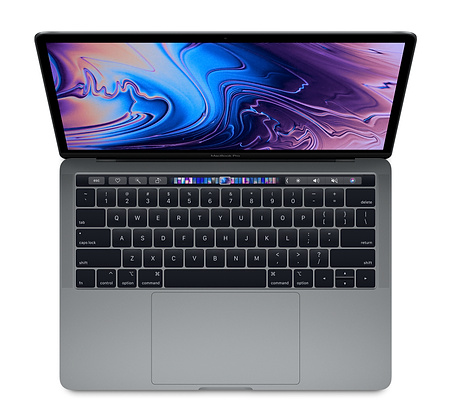
The MacBook Pro 13-inch (2019, two Thunderbolt 3 ports) was Apple’s entry-level Pro. It brought the Touch Bar, Touch ID, a True Tone display and the T2 chip to the cheaper model, along with a quad-core Intel Core i5 processor.
With only two USB-C ports, both on the left side, you will probably want a hub for monitors and accessories. It suits students and everyday professional work, but test the butterfly keyboard thoroughly before buying.
Every refurbished MacBook Pro 13-inch (2019, two ports) we sell is checked by our technicians and comes with a 12-month warranty. Browse our refurbished MacBook Pro range, or book a repair if you already own one.
About This Model
The MacBook Pro 13-inch (2019, two Thunderbolt 3 ports) brought a quad-core processor and Touch Bar to the entry-level 13-inch Pro range. As a used purchase, it is worth comparing when the price, condition and software compatibility suit your needs.
Complete Mac Solutions supplies used and refurbished Macs in Bristol and across the UK. We also repair this model, helping owners assess faults and compare repairing an existing laptop with buying a replacement.
This guide covers the two-port Intel model. It is different from the four-port Pro sold in the same year and from the later M1 MacBook Pro.
Identify the specification before comparing prices
The full model and configuration matter. Ask for the machine’s model information rather than relying on a description such as “13-inch Pro with Touch Bar”.
- Processor: 1.4GHz quad-core Intel Core i5, with a 1.7GHz quad-core Core i7 option.
- Memory: 8GB or 16GB onboard memory.
- Storage: 128GB, 256GB, 512GB, 1TB or 2TB SSD configurations.
- Graphics: Intel Iris Plus Graphics 645.
- Display: 13.3-inch Retina, 2560 × 1600 resolution, P3 colour and True Tone.
- Connections: two Thunderbolt 3 USB-C ports and a headphone socket.
- Controls: Touch Bar, Touch ID and Force Touch trackpad.
- Camera: 720p FaceTime HD.
Who should consider this model?
For documents, research, email and compatible everyday applications, a suitable example can be worth comparing within a smaller budget. Check the software you need before deciding.
For photography, music production, development or video work, explain your projects and applications. Occasional creative use and demanding daily work can need very different specifications.
Do not assume the Pro name means an older laptop will meet every current application’s requirements. Compare suitable machines around the work you need to do.
If you specifically need an Intel Mac, verify that requirement with your software or equipment supplier. The operating system, application version and licences matter alongside the processor.
The 128GB storage option needs particular care
Some examples have a 128GB SSD. That capacity can leave limited space once the operating system, applications and working files are installed.
Check how much storage you currently use and allow room for future documents and projects. A low-priced 128GB listing may be unsuitable if you already need more local space.
A larger SSD configuration may be more practical. External drives can help with files, but they add cost and another item to carry if you work away from home.
Internal storage and memory should be chosen at purchase. Do not budget on conventional later upgrades, and keep a separate backup of important work.
Choosing memory and processor
An 8GB machine may suit lighter needs. If your normal day involves several applications, many browser tabs or larger files, discuss whether a 16GB configuration would be more suitable.
A Core i7 listing is not automatically better value than a Core i5. Compare memory, storage, battery condition and the price of alternatives before paying more for the processor option.
Tell us where your current laptop struggles. Slow application launches, limited storage and difficulty handling a demanding project can have different causes and need different buying decisions.
Keyboard and Touch Bar concerns
This model uses a butterfly keyboard, unlike the Magic Keyboard fitted to the 2020 two-port Intel Pro. That distinction belongs in any comparison between the two generations.
Test every key carefully. Watch for repeated characters, missed presses and sticky or inconsistent keys. Check the space bar, modifier keys and typing over more than a few seconds.
Ask about previous keyboard repairs and intermittent faults. A short demonstration cannot establish that a keyboard has never shown a problem.
Test the Touch Bar, Touch ID and trackpad too. If you already own a laptop with these symptoms, we can assess it and explain repair options.
Connections and desk setup
With two USB-C connections, think through how you will charge and connect equipment at the same time. A suitable hub or dock may be useful for your arrangement.
Check compatibility rather than assuming every USB-C accessory supports the same functions. Monitors, storage and other equipment may require particular adapters or capabilities.
If you regularly connect several devices, compare the four-port model and other available Macs. Include the cost of accessories in the purchase budget.
Software support and future needs
Apple currently lists macOS Sequoia as this model’s newest compatible operating system. Check the software versions you need now and expect to use during your ownership.
An existing application working on a laptop does not guarantee that every new version will remain compatible. Business and course requirements deserve particular attention.
If you have no specific Intel requirement, include suitable Apple silicon models in your comparison. Condition, warranty, battery health and software needs all belong alongside price.
For Bristol students and businesses
Bristol students should begin with their course’s applications. A computer for essays and research has different requirements from one intended for demanding design, music or technical projects.
We can help compare suitable refurbished Macs and discuss current student offers. Allow for adapters, storage and other equipment required by your course.
Business customers should explain their applications, remote access arrangements, monitors and security requirements. We can discuss suitable configurations and sourcing options for individuals or teams.
Choosing around the complete working setup is more useful than assuming a laptop suits someone simply because it is advertised as a student or business machine.
Battery and used buying checks
Ask about battery health, actual running time, previous repairs and any intermittent faults. Cycle count is useful context, but should not be the only battery check.
Inspect the screen for marks, cracks and uneven illumination. Move the lid through its normal range, and test the camera, microphone, speakers, keyboard and trackpad.
Check both ports for charging and suitable connected equipment. Confirm the charger and accessories included.
Make sure the Mac is ready for a new owner, without another owner’s Activation Lock or unwanted organisation management. Establish whether advertised software licences can legitimately transfer.
Many of our Macs come fully boxed with all accessories and in fantastic condition. We confirm the individual machine’s condition, packaging and included items.
MacBook Pro repairs in Bristol
We can assess keyboard faults, battery problems, charging concerns, damaged screens, trackpad issues, Touch Bar faults and Macs that will not start.
Diagnosis comes before recommending components. A charging fault may involve the charger, cable, ports or internal hardware. A blank screen does not automatically establish that the display has failed.
Unusual fan noise, heat or shutdowns should be described in context. Tell us which applications are running and when the symptoms appear.
If the battery looks swollen or liquid has entered the laptop, stop using and charging it and contact us for advice.
Repair, replacement and warranty
Compare a repair quotation with the laptop’s overall condition, battery health and suitability for your work. If important files are on a non-starting Mac, mention them before authorising repairs.
Hardware repair and data recovery are separate outcomes. We can discuss your priorities and the available options.
Stock changes regularly. Our supplier network can often help us source a suitable specification within days, subject to availability.
Refurbished Intel Macs purchased from Complete Mac Solutions include a 12-month sales warranty for qualifying faults under normal use. Repairs carry a separate 12-month repair warranty.
The sales warranty excludes accidental damage, liquid damage, misuse and normal battery capacity decline, among other exclusions in our policy. Covered sales claims include postage both ways within the UK. Statutory rights are unaffected.
We provide repairs in Bristol and postal arrangements for UK customers. Contact us before sending your machine.
References and useful links
- Apple: MacBook Pro 13-inch 2019 two-port specifications
- Apple: July 2019 MacBook Pro launch information
- Apple: model identification and compatible operating systems
- Refurbished MacBook Pro sales
- Mac repairs in Bristol
- Mac data recovery
- Offers and student deals
- Refurbished Mac warranty
- UK postage information
- Contact Complete Mac Solutions
Compare the MacBook Pro 13-inch (2019, two ports) with similar models
The four-port 2019 model has faster processors and more ports. The 2020 two-port model looks the same but has the far more reliable Magic Keyboard, and the MacBook Pro 13-inch M1 is much faster with far better battery life.
- MacBook Pro 13-inch (2019, four ports)
- MacBook Pro 13-inch (2020, two ports)
- MacBook Pro 13-inch (2018, four ports)
- MacBook Pro 13-inch M1 (2020)
Buy or repair a MacBook Pro 13-inch (2019, two ports)
Contact Complete Mac Solutions to check current stock, ask us to source a specific configuration or book a repair. We supply and repair Macs across the UK. See all models in our Mac model guides.
Top image credit
Photo: Laptopsarena. Wikimedia Commons source · CC BY-SA 4.0. Cropped to show the display, resized and compressed to WebP; responsive versions supplied. Display detail from a 13-inch Touch Bar MacBook Pro. The photographed computer’s exact year, chip and port configuration are unconfirmed; this is not an exact-model photograph.
