
MacBook Air 15-inch M2 (2023): Refurbished, Specs & Repairs

A big-screen MacBook Air that is still light and silent
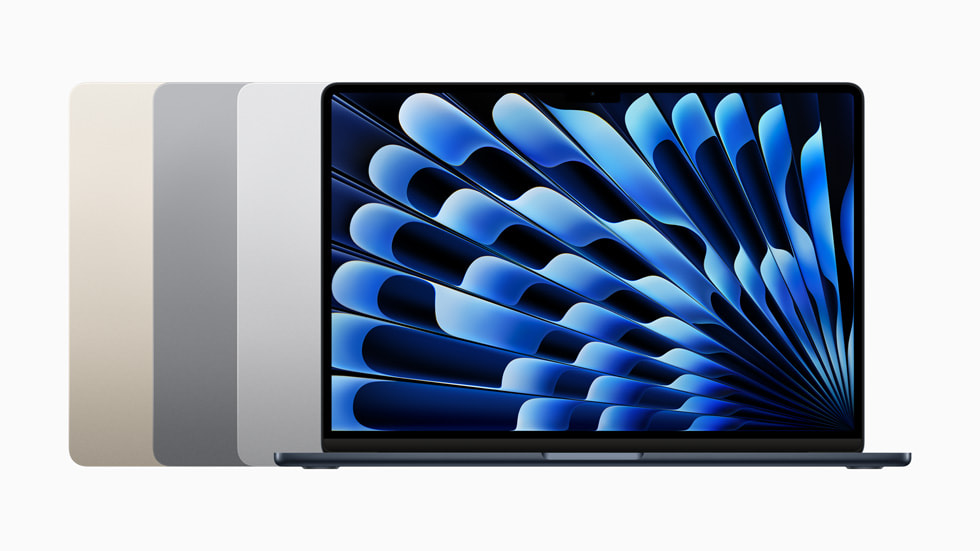
The MacBook Air 15-inch M2 (2023) is the first MacBook Air with a 15.3-inch Liquid Retina display. It gives you much more room for spreadsheets, editing and split-screen work while staying thin, light and completely silent. It also has a six-speaker sound system, MagSafe and a 1080p camera.
It is ideal if you want a larger screen than the 13-inch Air without the weight and cost of a MacBook Pro. Like other M2 Airs, it officially supports one external display.
Every refurbished MacBook Air 15-inch M2 (2023) we sell is checked by our technicians and comes with a 24-month warranty. Browse our refurbished MacBook Air range, or book a repair if you already own one.
About This Model
The MacBook Air 15-inch M2 (2023) is worth considering if you want more screen space for work, study or everyday use without moving to a MacBook Pro. Its appeal is straightforward: a roomy display, quiet operation and a design that remains practical to carry.
Complete Mac Solutions helps customers buy refurbished MacBook Air models and arrange Mac repairs in Bristol. Whether you are looking for this particular model or deciding whether to repair one you already own, the best thing to do is just call us. We can discuss your needs, budget or symptoms and help you choose the next step.
Which MacBook Air is this?
This page covers the first 15-inch MacBook Air, introduced in 2023 with Apple’s M2 chip. It is a different model from the 13-inch MacBook Air M2 (2022) and later 15-inch Air generations.
When comparing adverts, check the screen size, chip, memory and storage together. “MacBook Air 2023” on its own does not tell you everything you need to know about the machine being offered.
MacBook Air 15-inch M2 specifications
- Processor: Apple M2 with an 8-core CPU and 10-core GPU.
- Display: 15.3-inch Liquid Retina, 2880 × 1864 resolution and 500-nit brightness.
- Memory: 8GB, 16GB or 24GB unified memory, depending on configuration.
- Storage: 256GB, 512GB, 1TB or 2TB SSD.
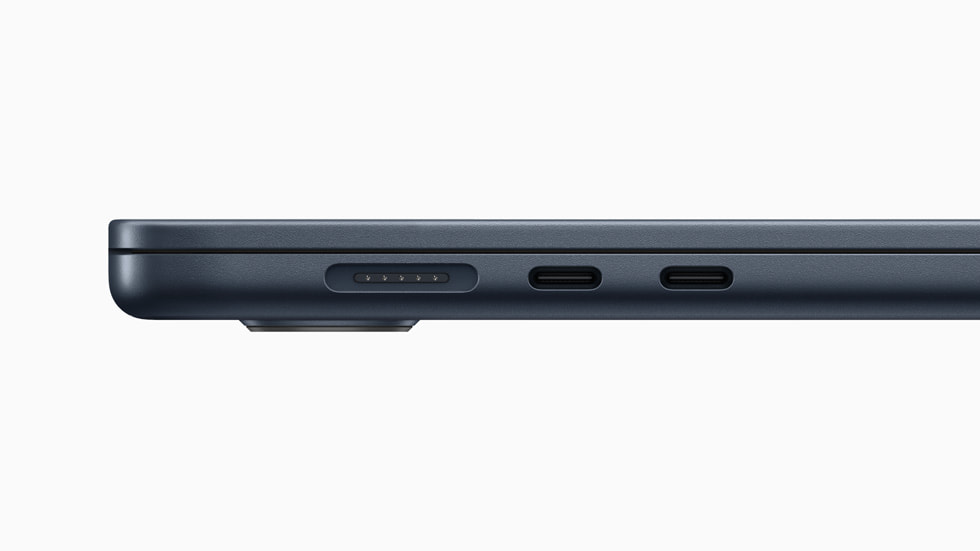
- Connections: MagSafe 3, two Thunderbolt / USB 4 ports and a headphone socket.
- Camera and audio: 1080p camera and six-speaker sound system.
- Controls: backlit Magic Keyboard, Touch ID and Force Touch trackpad.
- Weight: approximately 1.51kg.
These are the model’s available specifications, rather than a description of stock currently available. Ask us to confirm the details of the particular Mac you are considering.
What did reviewers think?
Ars Technica and Notebookcheck both reviewed this model positively as a larger everyday MacBook. Their findings highlighted its useful screen size, keyboard, speakers and quiet operation, alongside the limitations of its connections and cooling.
Ars Technica particularly valued the extra workspace for professional tasks that do not require unusually powerful hardware. Notebookcheck’s testing also found strong everyday performance and good battery endurance, while showing that prolonged heavy workloads can reduce performance.
Our buying conclusion is that the 15-inch Air makes sense when a comfortable workspace matters more to you than maximum sustained processing power. For a refurbished purchase, compare the actual specification, battery condition and price rather than relying on the original review score alone.
A bigger screen for work and university
The additional screen space can make working with a document and reference material side by side more comfortable. It is useful to consider if you spend long periods writing assignments, reviewing spreadsheets, managing accounts or switching between several windows.
There is a trade-off when carrying it. A larger laptop needs more room in your bag and on a small desk. If you frequently travel with your Mac, compare the physical size with a 13-inch Air before deciding.
For students, start with the software your course requires. Tell us about any specialist applications, external monitors or other equipment you need to use. Choosing around those requirements helps avoid buying a Mac that looks suitable but does not fit your course.
Choosing memory and storage
Do not compare two refurbished examples by chip and screen size alone. An 8GB/256GB machine and a 16GB/512GB machine offer different amounts of working memory and file space, which should be reflected in your buying decision.
For straightforward documents, browsing and email, a lower specification may meet your needs. If you keep many applications open, work with larger creative projects or want more flexibility for future workloads, discuss the benefits of additional memory.
Think about storage separately. Coursework, photographs, video and application libraries can occupy substantial space. An external drive may help with files, but it does not increase the laptop’s memory.
Memory and internal storage are not ordinary user upgrades on this model. Choose an appropriate configuration when buying rather than budgeting for a conventional RAM or SSD upgrade later.
Charging, accessories and external monitors
This model can charge through MagSafe or a suitable USB-C charging connection. It natively supports one external display, up to 6K at 60Hz.
If you need two external monitors, describe your setup before buying. Do not assume that adding a standard dock will change the Mac’s native display limit. Also check which adapters you need for older accessories, memory cards or a monitor with an HDMI connection.
Confirm the supplied charger and cable with us. Many of our Macs are fully boxed with accessories and in excellent condition, but the items included vary between individual machines.
Battery life on a refurbished example
Apple quoted up to 15 hours of wireless browsing and 18 hours of movie playback under its test conditions. Those figures describe testing of new machines and are not a promise for every refurbished example.
Ask about the particular battery’s condition. Your applications, screen brightness and workload also affect how long the Mac runs between charges. If reliable use away from a socket is especially important, tell us when discussing a purchase.
Faults to check and repair options
The symptoms below are reasons to seek diagnosis, rather than evidence that every 15-inch M2 Air develops the same problems. A fault may involve software, an accessory or internal hardware, and the right repair depends on establishing its cause.
Cracked screens, lines or no picture
Display damage and image problems need assessment before choosing replacement parts. Tell us whether the Mac appears to start, whether an external monitor shows a picture and whether the fault changes when you move the lid.
We can investigate the problem and discuss the repair options. If there has been an impact, mention it even when the damage is not obvious from the outside.
Battery wear and unexpected shutdowns
A battery service warning, reduced running time or unexpected shutdowns can make an otherwise useful laptop frustrating to use. Ask us to assess the cause and whether battery replacement is an appropriate option.
Normal battery capacity decline is different from a covered hardware fault. The condition of the rest of the Mac and the cost of the work will help you decide whether repair makes sense.
MagSafe or USB-C charging problems
Charging problems can involve the adapter, cable, socket or internal components. Let us know whether MagSafe, USB-C or both are affected, and whether the fault is intermittent.
Do not buy replacement parts solely from the symptom. Testing the charging setup and the Mac helps identify where attention is needed.
Keyboard, trackpad and Touch ID problems
Missed keystrokes, unreliable cursor control or trouble using Touch ID can interrupt everyday work. Describe exactly which controls are affected and whether the issue happens all the time.
Tell us about any spill or previous repair. That history can be useful even if the problem appeared some time afterwards.
Heat, slow performance and crashes
The 15-inch M2 Air has a fanless design. Becoming warm during demanding work is not, by itself, proof of a fault, and there is no cooling fan to replace.
If it has suddenly become slow during ordinary use, repeatedly crashes or fails to start, we can help establish what has changed. Mention recent software installations, updates, damage and any important files before work begins.
MacBook Air 15-inch M2 repairs in Bristol
Complete Mac Solutions offers Apple Mac repairs in Bristol. We can help you compare the cost of repairing your existing Air with replacing it.
When enquiring, describe the symptoms, any damage or previous repairs, and whether important data is involved. If you depend on the Mac for work or study, mention your deadline so we can discuss what is practical.
Just call us to explain the problem. You do not need to know which component has failed before getting in touch.
Buying a refurbished MacBook Air 15-inch M2
Our refurbished stock moves quickly. The best way to check availability is to call us with your budget and preferred specification. If the right example is not currently available, we can check our suppliers and can often source a suitable Mac within days, subject to availability.
Compare the condition, battery, memory, storage and supplied accessories together. We can also discuss alternatives through our refurbished MacBook Air sales service or the broader Apple Macs for sale range.
Our warranty on this M2 MacBook Air
A used or refurbished M2 MacBook Air bought from Complete Mac Solutions comes with our 24-month warranty for covered faults that develop under normal use. Our standard warranty is 12 months, extended to 24 months for Macs with M1–M5 family chips.
Covered hardware faults include the motherboard, display, keyboard, trackpad, charging and other internal components. Accidental or liquid damage, misuse, unauthorised repairs, cosmetic wear, normal battery capacity decline and software issues caused by your own installations or modifications are excluded.
Please contact us before returning a Mac for a warranty claim. We pay postage both ways for covered claims and will repair the Mac or, where appropriate, provide a replacement or another suitable remedy.
Read our refurbished Mac warranty page for the full terms. This warranty is additional to your statutory rights and does not affect them.
References and further reading
- Apple: MacBook Air 15-inch M2 (2023) technical specifications
- Apple: launch information and product images
- Apple: MacBook Air 15-inch M2 (2023) repair manual
- Ars Technica: hands-on review
- Notebookcheck: review and performance testing
Compare the MacBook Air 15-inch M2 (2023) with similar models
The 13-inch M2 Air is smaller and cheaper. If you need more performance, more ports or support for more displays, compare the 14-inch MacBook Pro models.
- MacBook Air 13-inch M2 (2022)
- MacBook Air M1 (2020)
- MacBook Pro 14-inch M3 (2023)
- MacBook Pro 16-inch M1 Pro (2021)
Buy or repair a MacBook Air 15-inch M2 (2023)
Contact Complete Mac Solutions to check current stock, ask us to source a specific configuration or book a repair. We supply and repair Macs across the UK. See all models in our Mac model guides.
Image credit
Photo: KKPCW. Wikimedia Commons source · CC BY-SA 4.0. Resized and compressed to WebP.
