
MacBook Pro 13-inch Retina (Early 2015): Refurbished, Specs & Repairs

The last 13-inch MacBook Pro with MagSafe, HDMI and USB-A
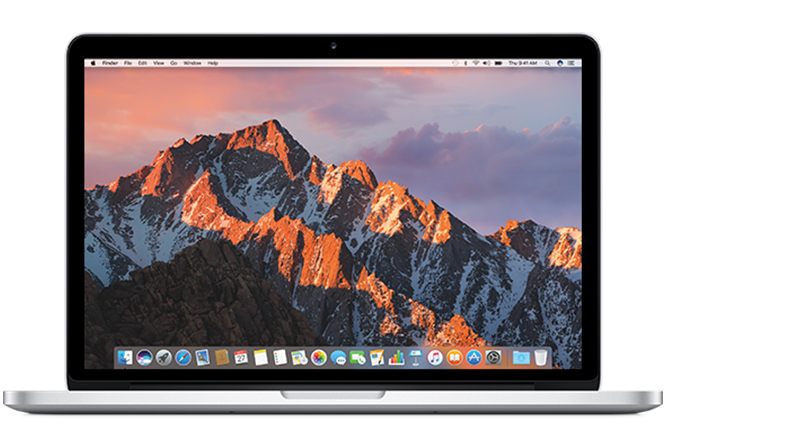
The MacBook Pro 13-inch Retina (Early 2015) is the final 13-inch Pro of the classic design, and many people still consider it one of the best-built Apple laptops. It has the reliable scissor-switch keyboard, a Force Touch trackpad, MagSafe 2 charging and a full set of ports including HDMI, USB-A and an SD card slot.
It is a sensible choice for everyday tasks and older software, but it is no longer supported by the newest macOS versions. Battery condition varies a lot on machines of this age, so it is one of the first things we check.
Every refurbished MacBook Pro 13-inch Retina (Early 2015) we sell is checked by our technicians and comes with a 12-month warranty. Browse our refurbished MacBook Pro range, or book a repair if you already own one.
About This Model
The MacBook Pro 13-inch Retina (Early 2015) is an Intel laptop with a sharp display, a traditional keyboard and useful built-in connections. It appeals to buyers who want an affordable Mac for an established workflow, but its age, battery condition and software limits deserve careful consideration.
Complete Mac Solutions supplies refurbished Macs for businesses, students and home users in Bristol. We also provide MacBook repairs, helping you assess faults and decide whether to repair an existing laptop or replace it.
We carry a broad range of Macs and can source models and configurations through our supplier network. Many of our Macs come fully boxed with all accessories and in fantastic condition. Ask about the condition, packaging, charger and other accessories included with the particular machine you are considering.
Identify the correct 2015 MacBook Pro
This guide covers the MacBook Pro (Retina, 13-inch, Early 2015), model identifier MacBookPro12,1. Its underside model number is A1502, but that number also appears on earlier 13-inch Retina models. Open the Apple menu and choose About This Mac to confirm the full model name.
The 15-inch MacBook Pro from 2015 is a different machine. This 13-inch version has dual-core processors and integrated Intel graphics, so do not assume specifications from a 15-inch advert apply to it.
Specifications at a glance
| Display | 13.3-inch Retina, 2560 × 1600 resolution |
|---|---|
| Processor | 2.7GHz or 2.9GHz dual-core Intel Core i5; optional 3.1GHz dual-core Core i7 |
| Graphics | Intel Iris Graphics 6100 |
| Memory | 8GB or 16GB, soldered to the logic board |
| Original storage options | 128GB, 256GB, 512GB or 1TB PCIe flash storage |
| Connections | Two USB 3 ports, two Thunderbolt 2 ports, HDMI, SDXC, headphone socket and MagSafe 2 charging |
| Trackpad | Force Touch |
| Weight | Approximately 1.58kg |
Check the actual installed storage and memory before buying. A refurbished machine may have a replacement SSD or other previous repair work.
What is it like to use?
The Retina screen and compact size make this a practical laptop for reading, writing and compatible everyday applications. Its built-in HDMI, USB-A and SD card connections can be convenient when working with older peripherals.
The 2015 model introduced Force Touch to the 13-inch MacBook Pro. It retains physical function keys and predates the butterfly keyboard used in later models. There is no Touch Bar or Touch ID.
Our buying advice is to test your real workload. An older dual-core Intel Mac should not be chosen on the “Pro” name alone. Check application compatibility, responsiveness and battery behaviour, then compare it with newer alternatives at a similar total budget.
Is it suitable for business?
Complete Mac Solutions supplies Macs for business, including laptops for individual users and machines for teams. Tell us about your applications, peripherals, budget and working arrangements so we can help you choose an appropriate model.
A 2015 MacBook Pro may suit a specific established workflow that remains compatible. For a new business purchase, check your accounting software, browser-based services, meeting applications and any specialist tools before committing.
Include software support, backups and your organisation’s security requirements in the decision. A low purchase price is less useful if essential services stop working or the laptop needs immediate repairs. If you need a machine for a longer-term business rollout, compare newer Macs as well.
Buying advice for Bristol students
Bristol students often need to balance price, portability and course requirements. This MacBook Pro can be an option for compatible writing and research applications, but check what your course actually requires before buying.
Design, music, engineering, architecture and film courses can depend on particular software versions or hardware. Do not assume an older Mac will run the current edition of every creative application.
Battery condition matters if you plan to spend the day between lectures and the library. Compare the complete cost of the laptop, any necessary battery work and accessories with a MacBook Air M1 or 13-inch MacBook Pro M1.
macOS and application compatibility
Apple lists macOS Monterey as the newest officially compatible operating system for this model. Before buying, check the requirements of the applications, browser and online services you need.
Hardware that still switches on and works well can nevertheless be limited by software compatibility. For business or coursework, make this check before choosing the laptop rather than discovering the restriction after purchase.
Memory and SSD upgrades
The RAM is soldered to the logic board. An 8GB machine cannot receive an ordinary RAM upgrade to 16GB, so choose enough memory at the outset.
The SSD is removable, unlike the storage in many newer MacBooks. However, its connector is proprietary: it is not a standard drive that can be swapped without checking compatibility. Discuss the replacement drive, any adapter, firmware requirements and backup arrangements before arranging an upgrade.
An SSD replacement can address a failed drive or a capacity shortage. It will not increase the processor’s performance or extend Apple’s official macOS compatibility.
Known repair concerns and checks
Some concerns are associated with this generation, while others reflect age and use. They do not mean every 2015 MacBook Pro will develop the same faults.
Keyboard and trackpad stopping together
The trackpad cable is a documented troubleshooting point on the 2015 13-inch model. If the built-in keyboard and trackpad become unreliable or stop responding together, the cable and its connections deserve investigation.
This symptom does not establish the cause on its own. Diagnosis should distinguish cable problems from other hardware or software issues before replacing larger assemblies.
Display coating deterioration
Some Retina MacBooks develop deterioration of the anti-reflective coating, often called “Staingate”. It can look like patches or stains, particularly with the screen off or at low brightness.
Inspect the display under different lighting conditions before buying. Coating wear is different from cracked glass, image lines or a failed backlight. Ask for an assessment of the actual problem and available options.
Battery wear and swelling
Reduced runtime, unexpected shutdowns or a battery service message deserve checking. Battery condition is especially important on a laptop of this age; original launch battery-life figures do not describe a used machine’s current endurance.
If the case is bulging or the trackpad has become raised, stop using and charging the laptop and arrange an assessment. Battery replacement involves a glued-in assembly and careful handling.
Charging and MagSafe problems
Check the charger, cable and charging connection. Intermittent charging can have more than one cause, so avoid assuming that a new battery will solve it. Ask what charger is included when buying a refurbished example.
Fan noise, overheating or slow performance
A fan running hard during demanding work is different from persistent noise during light use. Describe when the problem occurs and which applications are open. Storage, software, cooling and other hardware should be considered during diagnosis.
Independent repair assessment
iFixit’s teardown gave the Early 2015 13-inch Retina MacBook Pro a repairability score of 1 out of 10. Its assessment highlights the soldered memory, glued battery and integrated display assembly.
That score does not mean repair is impossible. It explains why some jobs require substantial labour and why a clear quote matters before proceeding. The removable SSD is also covered by a separate model-specific replacement guide.
MacBook Pro repairs in Bristol
Complete Mac Solutions can assess your laptop through our Apple Mac repair service in Bristol. Tell us the full model name, symptoms and whether your important files are backed up.
If you depend on the Mac for business or study, explain any deadline. We can discuss the available repair options and whether the cost makes sense alongside the laptop’s condition and your future requirements.
Buying a refurbished 2015 MacBook Pro
Confirm the exact model, installed RAM and SSD, battery condition, screen appearance and included charger. Test the keyboard, trackpad, Wi-Fi, sound and ports you intend to use. Ask about testing, warranty and after-sales support for the specific machine.
Complete Mac Solutions supplies refurbished Macs for business, study and home use. Browse our Apple Macs for sale or tell us the configuration you need. We can help you compare this model with newer options and discuss repairs for a MacBook you already own.
References and further reading
- Apple: MacBook Pro Retina, 13-inch, Early 2015 specifications
- Apple: identify your MacBook Pro and its newest compatible macOS
- Apple: Early 2015 MacBook Pro announcement
- iFixit: Early 2015 13-inch Retina MacBook Pro repair information
- iFixit: teardown and repairability assessment
- iFixit: SSD replacement guide
- iFixit: keyboard troubleshooting, including trackpad cable faults
- iFixit: information about Retina display coating deterioration
Compare the MacBook Pro 13-inch Retina (Early 2015) with similar models
The 2014 model is very similar but lacks Force Touch. For a modern alternative with current macOS support, compare the MacBook Air M1 or the MacBook Pro 13-inch M1.
- MacBook Pro 13-inch Retina (2014)
- MacBook Pro 15-inch Retina (2015)
- MacBook Pro 13-inch (2016)
- MacBook Pro 13-inch M1 (2020)
Buy or repair a MacBook Pro 13-inch Retina (Early 2015)
Contact Complete Mac Solutions to check current stock, ask us to source a specific configuration or book a repair. We supply and repair Macs across the UK. See all models in our Mac model guides.
Top image credit
Photo: Mike Stahl. Wikimedia Commons source · CC BY-SA 4.0. Resized and compressed to WebP; responsive versions supplied. Design detail: the MagSafe 2 connector on a 13-inch Retina MacBook Pro; the exact year of the photographed computer is unconfirmed.
