
MacBook Pro 15-inch (2018): Refurbished, Specs & Repairs

A six-core 15-inch MacBook Pro for creative work
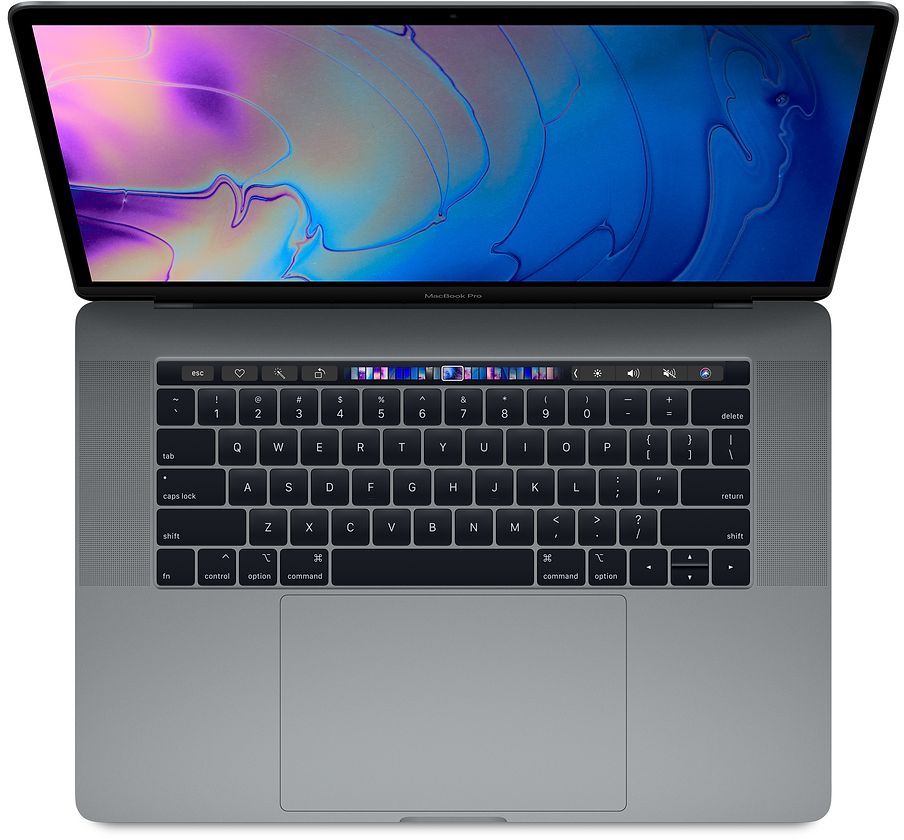
The MacBook Pro 15-inch (2018) brought six-core Intel Core i7 and i9 processors, up to 32GB of memory, a True Tone display and the T2 security chip to the 15-inch Pro. With dedicated Radeon Pro graphics and four Thunderbolt 3 ports, it handles photo, video and music projects well for an Intel laptop.
It runs hot under sustained heavy loads, particularly the Core i9 configurations, and uses the butterfly keyboard. Check the keyboard and battery carefully, and make sure the cooling fans are clean and quiet.
Every refurbished MacBook Pro 15-inch (2018) we sell is checked by our technicians and comes with a 12-month warranty. Browse our refurbished MacBook Pro range, or book a repair if you already own one.
About This Model
The MacBook Pro 15-inch (2018) combines a large Retina display, six-core Intel processors and dedicated Radeon graphics. As a used purchase, it deserves consideration when its specification, condition and software compatibility fit your needs.
Complete Mac Solutions sells used and refurbished Macs in Bristol and across the UK. We also repair this model, helping owners investigate faults and decide whether repairing an existing laptop or choosing a replacement is more practical.
Buying checks matter particularly on an older creative laptop. Processor and graphics specifications should be considered alongside keyboard condition, battery health and the applications you intend to use.
Specifications and configuration differences
Ask for the exact model and configuration before comparing adverts. Different processors, graphics options, memory and SSD capacities can make apparently similar listings quite different purchases.
- Processor: six-core Intel Core i7, with a six-core Core i9 option.
- Memory: 16GB or 32GB onboard memory.
- Storage: SSD configurations from 256GB to 4TB.
- Graphics: Radeon Pro 555X, 560X or later Vega 16 and Vega 20 options, alongside integrated Intel graphics.
- Display: 15.4-inch Retina, 2880 × 1800 resolution, P3 colour and True Tone.
- Connections: four Thunderbolt 3 USB-C ports and a headphone socket.
- Controls: Touch Bar, Touch ID and Force Touch trackpad.
- Camera: 720p FaceTime HD.
Is it suitable for your workload?
The larger display can appeal to people working with detailed documents, several windows or creative applications. However, a large screen does not establish whether the laptop meets your software requirements.
For photography, video editing, development or music production, explain the applications and project sizes you use. Occasional projects and demanding daily work may call for different machines.
If an Intel Mac is needed for a specific workflow, verify that requirement with the software or equipment supplier. Operating system support, application versions, plug-ins and licences also matter.
For general work without an Intel requirement, compare suitable Apple silicon alternatives. Look at the complete purchase rather than the original position of this model in Apple’s range.
Core i7, Core i9 and graphics
A Core i9 listing should not automatically command your budget. Compare the complete specification and whether your applications benefit from the higher processor option.
Check the Radeon configuration separately. A seller should identify the graphics fitted rather than provide a broad description such as “powerful graphics”.
For many buyers, memory, storage, condition and price will be central to the decision. We can help compare available machines around the work you need to complete.
Where practical, assess a laptop using representative applications or files. General performance claims cannot tell you how every project will behave.
Memory, storage and backups
Discuss whether 16GB or 32GB memory fits your workload. Describe what runs together, the size of your projects and where your current machine becomes restrictive.
A 256GB SSD can leave limited working room once applications and files accumulate. Check current storage use and allow space for future projects before buying.
Larger SSD capacities can be convenient, particularly if you need files available away from a desk. External drives may also form part of the setup.
Choose memory and internal storage at purchase rather than planning conventional later upgrades. Keep a separate backup: a large internal SSD does not protect your files from every form of loss.
Butterfly keyboard: inspect it carefully
The 2018 15-inch Pro uses a butterfly keyboard. It is different from the Magic Keyboard introduced on the 2019 16-inch MacBook Pro.
Test every key on a used example, looking for repeated letters, missed presses and sticky or inconsistent behaviour. Check the space bar, modifier keys and typing over more than a brief demonstration.
Ask about intermittent keyboard faults and previous repairs. Do not assume a replacement keyboard or a historic service programme establishes current warranty cover.
If your own Mac has keyboard problems, we can investigate and discuss repair options. Diagnosis should establish the issue before a larger assembly is recommended.

Display, battery and charging checks
Inspect the display on light and dark backgrounds. Look for cracks, marks, damaged pixels and uneven illumination, and note any changes as the lid moves.
Ask about battery health and actual running time. Cycle count is useful context, but it should not replace a wider assessment of condition and behaviour.
Test all four USB-C connections and confirm the charger and cable included. Plan any adapters needed for your equipment and include their cost in the purchase.
A distorted case or visibly swollen battery requires you to stop using and charging the machine and seek advice. Unexpected shutdowns or very short running time also deserve investigation.
Software support and buying for the coming years
Apple currently lists macOS Sequoia as this model’s newest compatible operating system. Check the requirements of your applications and the versions you expect to use.
An older application working today does not guarantee compatibility with future updates. Business security requirements and university course software should be checked before purchase.
Compare the expected period of ownership with the available alternatives. A lower initial price may not be the best overall purchase if the machine cannot meet your forthcoming needs.
For Bristol students and businesses
Bristol students studying creative or technical subjects should check their course’s requirements first. A laptop for essays and presentations can need a different specification from one intended for demanding design, music or video projects.
We can compare refurbished options and discuss current student offers. Allow for adapters, external storage and other essential equipment.
Businesses should explain applications, monitors, remote access and security requirements. We can help individuals and teams find suitable Macs, including sourcing a particular configuration where possible.
The right specification should reflect the work, rather than a broad advert claiming a laptop is suitable for every professional or student.
Buying a used example
Confirm model, processor, graphics, memory and storage. Ask about previous repairs and intermittent faults.
Test the keyboard, Touch Bar, trackpad, camera, microphone, speakers and ports. Inspect the casing and hinge area and establish battery condition.
Make sure the Mac is ready for a new owner, without another owner’s Activation Lock or unwanted organisation management. Check whether any advertised software licences can legitimately transfer.
Many of our Macs come fully boxed with all accessories and in fantastic condition. We confirm the packaging, accessories and condition of the individual machine before purchase.
MacBook Pro 15-inch repairs in Bristol
We can assess keyboard problems, damaged displays, battery concerns, charging faults, Touch Bar issues, trackpad problems and Macs that will not start.
Unusual heat, fan noise and shutdowns need investigation in context. Tell us what the laptop is doing when they occur and whether the behaviour has changed recently.
A charging problem does not automatically identify a failed battery, and a display symptom does not automatically establish the failed part. Diagnosis helps avoid unnecessary replacement work.
If liquid has entered the machine, stop using it and contact us. Mention important files before authorising work, especially when the Mac will not start.
Repair, replacement and warranty
Compare a repair quotation with battery health, overall condition and suitability for your work. If the machine still meets your needs, repair may be worthwhile.
Hardware repair and data recovery are separate outcomes. We can discuss your priorities and available options before work is authorised.
Our stock changes regularly, and our supplier network can often help source a suitable specification within days, subject to availability.
Refurbished Intel Macs purchased from Complete Mac Solutions include a 12-month sales warranty for qualifying faults under normal use. Repairs carry a separate 12-month repair warranty.
The sales warranty excludes accidental damage, liquid damage, misuse and normal battery capacity decline, among other exclusions explained in our policy. Covered sales claims include postage both ways within the UK. Statutory rights remain unaffected.
We provide repairs in Bristol and postal arrangements for UK customers. Contact us before sending your Mac.
References and useful links
- Apple: MacBook Pro 15-inch 2018 specifications
- Apple: 2018 MacBook Pro launch information
- Apple: model identification and compatible operating systems
- Refurbished MacBook Pro sales
- Mac repairs in Bristol
- Mac data recovery
- Offers and student deals
- Refurbished Mac warranty
- UK postage information
- Contact Complete Mac Solutions
Compare the MacBook Pro 15-inch (2018) with similar models
The 2019 15-inch adds an eight-core option. For a better keyboard and cooling, the 16-inch 2019 is the best Intel 16-inch. For cooler, quieter running and much longer battery life, compare the 16-inch M1 Pro.
- MacBook Pro 15-inch (2019)
- MacBook Pro 15-inch (2017)
- MacBook Pro 16-inch (2019)
- MacBook Pro 16-inch M1 Pro (2021)
Buy or repair a MacBook Pro 15-inch (2018)
Contact Complete Mac Solutions to check current stock, ask us to source a specific configuration or book a repair. We supply and repair Macs across the UK. See all models in our Mac model guides.
Image credit
Wikimedia Commons source · CC0. Resized and compressed to WebP.
